

A new technique that allows attackers to bypass Windows User Account Control (UAC) protections using the system’s built-in Private Character Editor, demonstrating how legitimate system utilities can be exploited to gain elevated privileges without user consent.
The attack leverages eudcedit.exe, Windows’ Private Character Editor located in C:\Windows\System32, which is designed for creating and editing user-defined characters (EUDC: End-User Defined Characters).
These custom glyphs can be mapped to Unicode code points for use in documents and applications, but the utility’s privileged execution model creates an unexpected attack vector.
The vulnerability stems from the application’s manifest configuration, which contains specific instructions that enable automatic elevation.
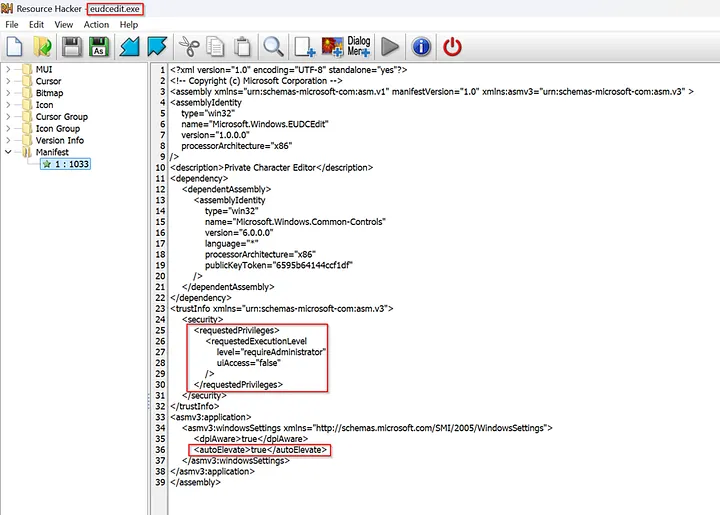
Two critical tags in the eudcedit.exe manifest enable this bypass: <requestedExecutionLevel level="requireAdministrator" /> instructs Windows to run the binary with full administrator rights, while <autoElevate>true</autoElevate> tells the system to bypass UAC prompts for trusted binaries when launched by administrative users.
This configuration means that when eudcedit.exe is executed by a user who belongs to the Administrators group under permissive UAC settings such as “Elevate without prompting,” Windows launches the application immediately with high integrity without displaying the typical UAC security dialog.
Windows UAC Bypassed
The attack methodology is remarkably straightforward, requiring only basic interaction with the Character Editor’s interface.
An attacker begins by executing eudcedit.exe, which opens without triggering UAC warnings due to its trusted status. Once the Private Character Editor interface loads, the user navigates to the File menu and selects “Font Links.”

Within the Font Links dialog, the attacker chooses the second available option and clicks “Save As,” which opens a standard Windows file dialog.
The critical step involves typing “PowerShell” in this dialog, which effectively launches an elevated PowerShell session with administrator privileges, completing the UAC bypass.

This technique is particularly concerning because it requires no additional tools, exploits, or complex procedures—only manipulation of a legitimate Windows system utility through its standard interface.
Security Implications
User Account Control was introduced in Windows Vista as a security boundary to prevent unauthorized operations requiring elevated privileges.
When applications attempt to perform system-level changes or installations, UAC typically prompts users for explicit consent before proceeding.
However, this bypass technique demonstrates how attackers can circumvent these protections by exploiting the trust relationships built into Windows system utilities.
The discovery highlights broader concerns about application manifest configurations and automatic elevation policies in Windows environments.
Organizations should review their UAC policies and consider implementing additional monitoring for unusual process execution patterns, particularly involving system utilities launching unexpected child processes like PowerShell sessions.
This vulnerability underscores the ongoing security challenges in balancing system usability with protection mechanisms, as legitimate system tools continue to present unexpected attack surfaces for privilege escalation.
Find this Story Interesting! Follow us on LinkedIn and X to Get More Instant Updates.

.webp?w=356&resize=356,220&ssl=1 "Microsoft Teams Blocking Users from Accessing Embedded Office Documents")


 protections using the system's built-in Private Character Editor.)