

A comprehensive suite of AI-powered enhancements for Windows 11, marking a significant step forward in the integration of artificial intelligence into everyday computing experiences.
The latest updates introduce innovative tools designed to streamline productivity, enhance creativity, and improve overall user interaction with Copilot+ PCs, reflecting Microsoft’s commitment to making AI accessible and practical for consumers across various use cases.
Microsoft has introduced groundbreaking productivity features that fundamentally change how users interact with their Windows 11 systems.
The most notable addition is Windows’ first agent optimized for Copilot+ PCs, integrated directly into the Settings application.
This intelligent agent allows users to describe desired changes using natural language, such as “I want to enable quiet hours” or “connect Bluetooth device,” and instantly receive actionable recommendations with one-click implementation.
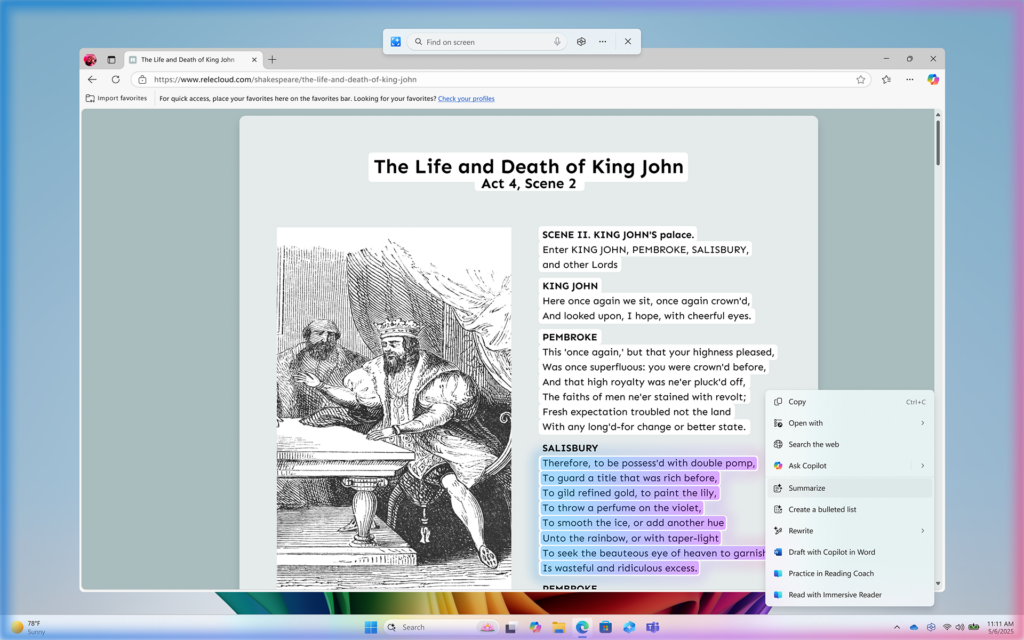
The enhanced Click to Do functionality represents another major leap in productivity technology.
This feature provides contextual actions for text and images displayed on screen, enabling users to maintain workflow continuity while accessing powerful AI capabilities.
New additions include Practice in Reading Coach, which helps improve reading fluency and pronunciation, and Read with Immersive Reader, offering a distraction-free reading environment with customizable display options.
The integration extends to Microsoft Teams, allowing users to schedule meetings or send messages directly from recognized email addresses without interrupting their current tasks.
Creative AI Features
The creative capabilities of Windows 11 have been significantly enhanced through advanced AI integration across multiple applications:
Photos App Enhancements:
- Relight functionality brings professional lighting controls to everyday snapshots.
- Users can place up to three virtual light sources around subjects.
- Adjust intensity, color, and position using intuitive sliders.
- Choose from preset options like “Studio Portrait” and “Cinematic Glow”.
Paint Application Upgrades:
- Sticker Generator creates custom stickers through simple text prompts.
- Users can generate unique visual elements by typing descriptions like “a cat wearing sunglasses”.
- Object Select tool utilizes AI to isolate and edit individual image elements.
- Streamlines the editing process for precise content manipulation.
Snipping Tool Improvements:
- Perfect Screenshot capabilities exclusive to Copilot+ PCs.
- Enables precise content capture without requiring post-capture cropping or resizing.
- Color Picker tool identifies and captures colors directly from screen.
- Provides HEX, RGB, or HSL values for designers, developers, and creative professionals.
Enhanced User Experience
Microsoft has implemented comprehensive system-level improvements focused on user experience and reliability.
Copilot Vision on Windows, now available in the United States, provides real-time screen analysis and contextual assistance, acting as a digital companion that can see what users see and offer insights and guidance.
This feature includes Highlights functionality, enabling step-by-step task guidance within applications.
System reliability has been enhanced through Quick Machine Recovery, a new mechanism that automatically detects and fixes widespread issues during unexpected restarts using the Windows Recovery Environment.
Microsoft has also streamlined the unexpected restart experience, reducing user wait times from 40 seconds to just 2 seconds for most consumer devices running Windows 11 version 24H2.
These updates are being gradually rolled out through controlled feature rollout over the coming month, with availability prioritized for Snapdragon-powered Copilot+ PCs before expanding to Intel and AMD devices.
Find this Story Interesting! Follow us on LinkedIn and X to Get More Instant Updates.

.webp?w=356&resize=356,220&ssl=1 "Microsoft Teams Blocking Users from Accessing Embedded Office Documents")


