
Most modern browsers advertise a single-click path to privacy called Incognito or Private Browsing. In reality, that promise extends only to erasing traces on the local device while leaving users broadly visible to websites, advertisers, internet-service providers (ISPs), employers, and governments.
Misunderstanding these limits is not benign: it fuels misplaced trust, influences risky behaviour, and sits at the centre of billion-dollar lawsuits against Google and other tech firms.
This report unravels the technology, disproves popular myths, and outlines practical steps for anyone who genuinely needs to browse with minimal exposure.
1 Origins and Design Goals of Private Browsing
Private browsing first appeared in Apple Safari (2005) and spread quickly to Firefox (Private Browsing), Chrome (Incognito), Edge (InPrivate), and others.
The stated goal across vendors is narrow: stop the browser from writing certain data history, cookies, caches, and form entries to the local disk once all private windows close.
1.1 Interface Cues Across Browsers
Vendors rely on subtle visual signals, such as dark toolbars, masked-hat icons, or the word Private, to remind users they are in an isolated session. Yet field studies show many people either fail to notice the cue or assume it means end-to-end anonymity.
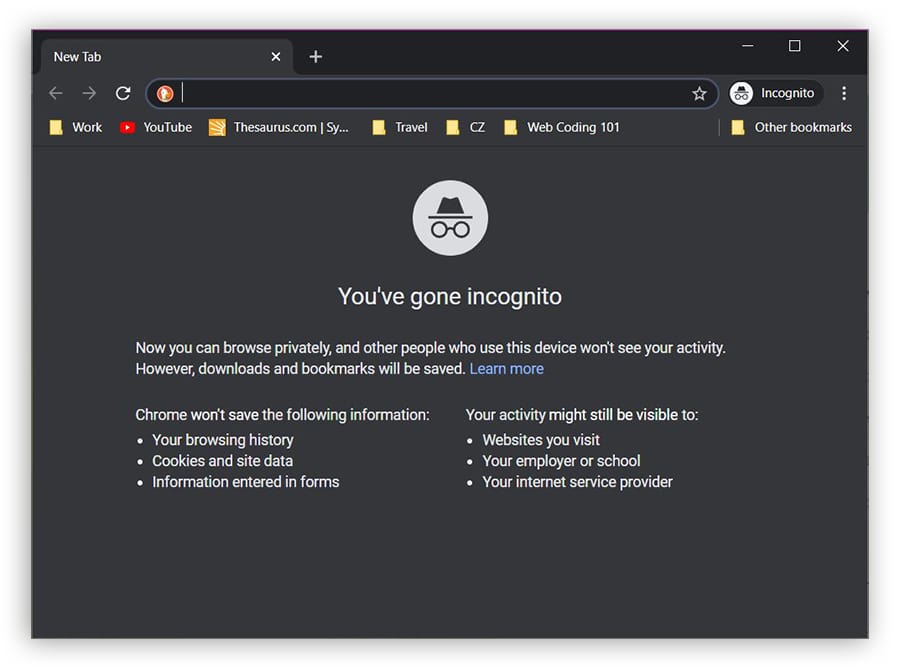
1.2 The Built-In Threat Model
Academic analyses define “local attacker” (room-mate or family member with later access to the machine) as the only adversary private browsing must block. No mainstream browser promises protection from “network attackers” (ISPs, hostile Wi-Fi, surveillance agencies) or “web attackers” who fingerprint devices across sessions.
2 What Incognito Mode Actually Does
Incognito’s core competence is local data hygiene. When you close every private window, the following artefacts disappear from the device:
- Page-visit history
- First-party cookies created in that session
- Form auto-fill entries and search drop-downs
- Cached images/scripts that would otherwise speed up reloads
- Download-list entries (though the files themselves stay on disk)
These housekeeping measures protect against shoulder-surfing, shared-device embarrassment, and multi-account conflicts (e.g., logging into two Gmail accounts side-by-side).
.webp)
The green bars show categories genuinely wiped by Incognito. The red bars reveal a longer list of elements, including IP addresses, DNS entries, and fingerprint traits that survive the private window, demonstrating the strictly local scope of its defences.
3 What Incognito Mode Does Not Protect
3.1 Network-Level Visibility
Traffic leaves the device unencrypted unless the site itself uses HTTPS, so ISPs, employers and café Wi-Fi operators can still inspect destinations and timing patterns. Even with HTTPS, metadata such as server IPs and domain names in the Server Name Indication field remain observable21.
3.2 Browser Fingerprinting & IP Leakage
Advanced trackers combine screen resolution, installed fonts, canvas rendering, and dozens of subtle signals to craft a fingerprint that persists across Incognito sessions and even across browsers. A 2023 commercial service advertises 99.5% re-identification accuracy despite VPNs or private windows.
WebRTC’s peer-to-peer framework can also leak local and public IP addresses unless explicitly blocked, an issue unaffected by private mode.
3.3 DNS, WebRTC, and Scheme-Flooding Quirks
Operating systems cache DNS look-ups outside the browser sandbox; forensic tools or simple commands (ipconfig /displaydns on Windows) reveal domains visited during a supposedly private session. Attackers have also demonstrated scheme-flooding—probing registered URL schemes to generate a cross-browser identifier that survives Incognito.
4 Common Misconceptions and User Behaviour
Laboratory and field studies paint a consistent picture: people wildly overestimate what Incognito hides.
In a University of Chicago/Leibniz survey of 450 participants, 56% believed Google could not record searches made while logged in to Incognito mode; 46% thought bookmarks would be invisible; 37% were certain employers or ISPs would be unaware of their traffic.
.webp)
4.1 Drivers of Misbelief
Researchers link misconceptions to marketing phrases like “browse privately” and to disclosures stuffed with legalese rather than plain-language warnings. The mismatch encourages riskier behaviour, logging into sensitive accounts on public PCs, assuming immunity from malware, or bypassing workplace policy under the radar.
4.2 Real-World Usage Patterns
Telemetry from 450 desktop volunteers showed private windows most frequently used for account-testing (logging into a second social-media identity), shopping surprises, adult content, and medical searches.
Surprisingly, participants also used Incognito for online banking—a task offering minimal benefit and potentially higher friction because saved credentials are absent.
5 Legal and Industry Implications
Chrome’s splash screen long implied users could “browse privately”; internal emails show Google’s own marketing chief urged clearer language because “It’s not truly private”. Class-action litigants argued the wording violated wiretap and privacy laws.
In 2024, Google agreed to delete “billions of data records” collected from Incognito sessions and to rewrite disclosures, though individual suits seeking $10 000 per user continue.
Regulators view the episode as precedent: vague privacy promises can trigger enforcement even without direct monetary harm, shifting the cost-benefit calculus for browser vendors.
6 Best Practices for Meaningful Privacy
- Use a reputable VPN or Tor for network-level anonymity. These tools encrypt or onion-route traffic, concealing sites from local routers and ISPs.
- Harden the browser. Enable anti-fingerprinting features (Firefox’s
privacy.resistFingerprinting, Brave’s default shields) and disable WebRTC unless needed. - Clear DNS caches (
ipconfig /flushdnson Windows,sudo dscacheutil -flushcacheon macOS) after sensitive sessions to avoid local artefacts. - Employ isolation beyond Incognito. Create separate browser profiles or use hardened privacy browsers for distinct personas, limiting cross-site correlation.
- Read the splash-screen fine print. Each vendor lists blind spots; understanding them prevents misplaced confidence and encourages layered defences.
Incognito mode is like a toothbrush rather than a hazmat suit: adequate for removing local traces but inadequate against most external observers. Treating it as an all-encompassing shield can lead to tracking, forensic recovery, and legal repercussions.
By recognizing its narrow design goals, combining them with encryption, anti-fingerprinting techniques, and an honest self-assessment of risk, users can browse with privacy grounded in reality rather than myth.


, employers, and governments.)